Goal:
To get the values of the page into dropdown which is selected in the pathfield.
Dialog Structure:
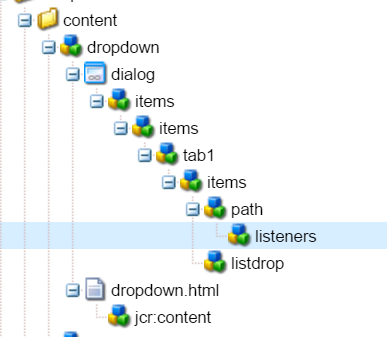
Create a dialog with one path field and selection field as shown in the image and listeners to the path field which is used to call the servlet and get the page values.
Listener:
Name of the listener is dialogclose :
function(){
var dialog = this.findParentByType('dialog');
var selectBox = dialog.findByType('selection')[0];
$.getJSON('/libs/dropdown?Path=' + this.value,
function(jsonData){
selectBox.setOptions(jsonData);
});
}
The above listerner is triggered when the pathfield is selected and when the browse dialog is closed.
for more info on listeners : https://docs.adobe.com/docs/en/cq/5-6/widgets-api/index.html
Servlet:
package com.geometrixx.sightly.servlets;
import java.io.IOException;
import javax.jcr.Node;
import javax.servlet.ServletException;
import org.apache.felix.scr.annotations.Component;
import org.apache.felix.scr.annotations.Properties;
import org.apache.felix.scr.annotations.Property;
import org.apache.felix.scr.annotations.Service;
import org.apache.sling.api.SlingHttpServletRequest;
import org.apache.sling.api.SlingHttpServletResponse;
import org.apache.sling.api.servlets.SlingAllMethodsServlet;
import org.apache.sling.commons.json.JSONArray;
import org.apache.sling.commons.json.JSONException;
import org.apache.sling.commons.json.JSONObject;
import com.day.cq.wcm.api.Page;
@Component(immediate = true, description="DropDown Servlet")
@Service(value = javax.servlet.Servlet.class)
@Properties(value={
@Property(name="sling.servlet.extensions",value={"html","json"}),
@Property(name="sling.servlet.methods",value={"GET","POST"}),
@Property(name="sling.servlet.paths",value={"/libs/dropdown"})
})
public class DropDown extends SlingAllMethodsServlet{
/**
*
*/
private static final long serialVersionUID = 1L;
protected void doGet(final SlingHttpServletRequest req,
final SlingHttpServletResponse resp) throws ServletException, IOException {
doPost(req, resp);
}
protected void doPost(final SlingHttpServletRequest req,
final SlingHttpServletResponse resp) throws ServletException, IOException {
JSONArray jsonArray = new JSONArray();
JSONObject jsonObject = new JSONObject();
try {
String pagePath = req.getParameter("Path");
Page selectedPage = req.getResourceResolver().getResource(pagePath).adaptTo(Page.class);
String pageTitle = selectedPage.getPageTitle();
String pageName = selectedPage.getName();
String pageNavigationTitle = selectedPage.getNavigationTitle();
jsonObject.put("text", "PageTitle");
jsonObject.put("value", pageTitle);
jsonArray.put(jsonObject);
jsonObject = new JSONObject();
jsonObject.put("text", "PageName");
jsonObject.put("value", pageName);
jsonArray.put(jsonObject);
jsonObject = new JSONObject();
jsonObject.put("text", "NavigationTitle");
jsonObject.put("value", pageNavigationTitle);
jsonArray.put(jsonObject);
resp.getWriter().println(jsonArray.toString());
} catch (JSONException e) {
// TODO Auto-generated catch block
e.printStackTrace();
}
}
}
Above servlet is used to generate the JSON response to get the options into dropdown as TEXT and VALUE pair.
